How POS Software Handles Returns, Exchanges and Refunds Without Losing Control of Stock
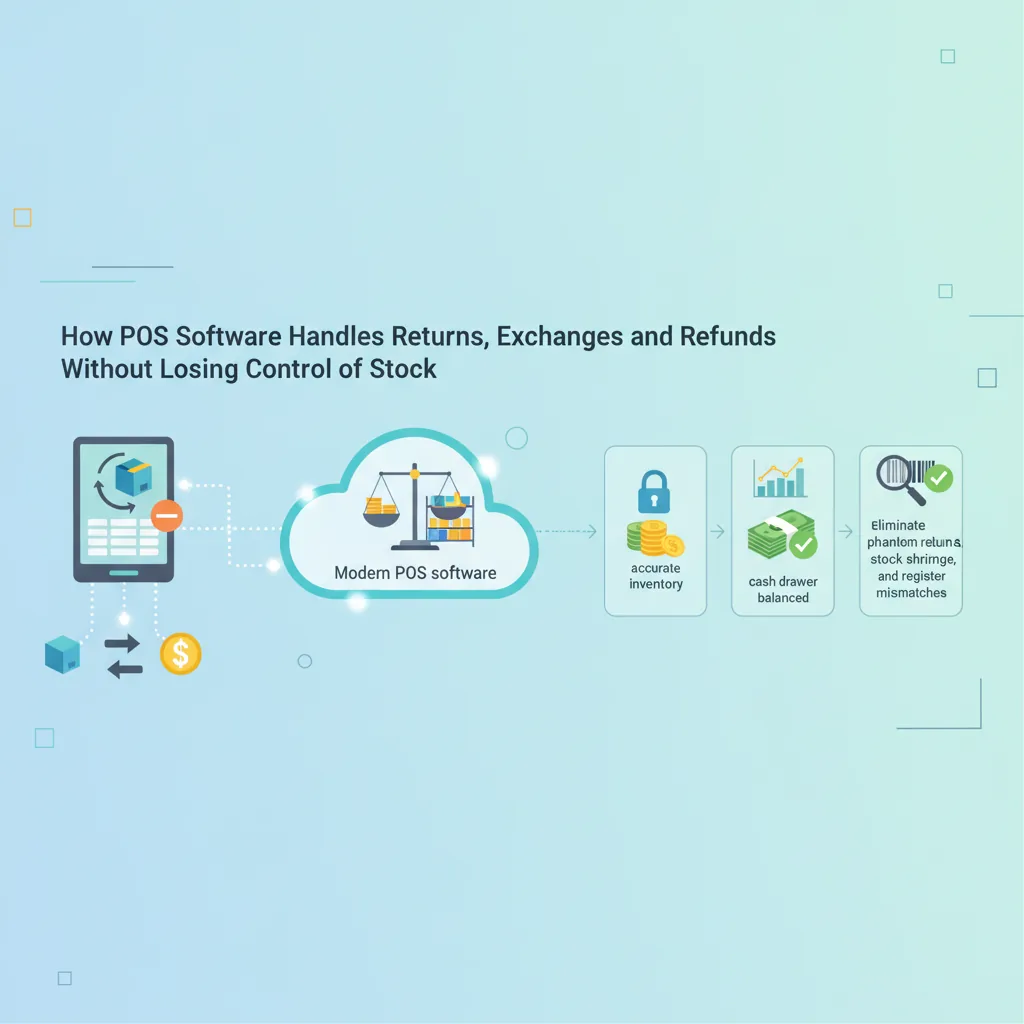
Discover how modern POS software handles returns, exchanges, and refunds to keep your inventory accurate and your cash drawer balanced. Learn practical retail SOPs to eliminate phantom returns, stock shrinkage, and register mismatches.
In this article
- The Hidden Costs of Manual Returns and Uncontrolled Exchanges
- How Modern POS Software Handles Returns and Protects Inventory
- 1. Receipt-Linked Validation
- 2. Dual-Entry Stock and Register Balancing
- 3. Seamless "One-Click" Exchanges
- 4. Smart Quarantine for Defective Goods
- 5. Permission Controls and Audit Trails
- Standard Operating Procedure: A Bulletproof Return Checklist for Your Store
- Cross-Branch Returns: Handling Multi-Store Logistics
- How CloudPOS Helps You Master Returns, Exchanges, and Stock Accuracy
- Protect Your Margins at the Counter
Every retail manager in Pakistan knows the dreaded feeling of evening reconciliation. Here is how POS software handles returns so that feeling goes away. The shutter is pulled down, the day's sales register looks healthy, but the cash drawer is short by Rs. 2,400. To make matters worse, your visual shelf audit shows two medium lawn suits missing, while your ledger claims they are still in stock. In almost eight out of ten cases, this mismatch does not stem from shoplifting or cashier math errors—it traces directly to an unorganized counter handling customer returns and exchanges.
Returns and exchanges are an inevitable reality of retail. Whether you run a bustling garment boutique in Lahore, an electronics store in Karachi, or a pharmacy in Rawalpindi, customers will bring items back. They bought the wrong size, changed their minds, or discovered a defect. Handled on paper or through disjointed register entries, returns create an operational blind spot where stock goes missing, profit margins bleed away, and register balances fall out of sync.
Here is an in-depth breakdown of how POS software handles returns, exchanges and refunds without losing control of stock, and how you can establish a foolproof workflow across your counters.
The Hidden Costs of Manual Returns and Uncontrolled Exchanges
When retail counters handle returns manually or on rigid, standalone registers, operations break down across three sensitive touchpoints:
- Cash-Stock Decoupling: A cashier hands Rs. 3,500 back to a customer from the drawer. If that transaction is not instantaneously tied to restocked inventory, the financial books show reduced cash while the stock ledger overstates unsold goods.
- The "Even Exchange" Trap: A customer swaps a blue shirt for a black shirt of identical value. Because no money changed hands, the cashier hands over the new item without ringing it up. Two weeks later, the system insists the black shirt is available for an online order, but the shelf is empty.
- Damaged Goods Mixed with Active Stock: If a returned item has a broken zipper, cracked casing, or torn packaging, an automated "return to stock" function can mistakenly return defective items to active shelves, frustrating the next buyer.
- Phantom Returns and Internal Leakage: Without strict user access permissions, dishonest counter staff can process fake refunds on past sales and pocket the cash from the till.
How Modern POS Software Handles Returns and Protects Inventory
A modern point of sale system transforms the return counter from a vulnerability into a tightly monitored, automated workflow. Here is how modern point-of-sale systems process reverse logistics without human error.
1. Receipt-Linked Validation
Controlled returns start with verifying original purchase data. Instead of taking an item back based on verbal claims, the cashier scans the barcode on the customer’s original receipt or pulls up their profile using their mobile number. The system verifies:
- The exact price paid (factoring in seasonal discounts, promo codes, or loyalty points used during the original checkout).
- The date of purchase to ensure it falls within your store’s return window (e.g., 7 or 14 days).
- The branch where the product was originally purchased.
This prevents customers from claiming refunds at full retail price for items bought during end-of-season sales.
2. Dual-Entry Stock and Register Balancing
When a return is approved, modern POS software executes two simultaneous ledger updates:
- Stock Ledger: The returned SKU count increases by one in real-time inventory records.
- Cash or Payment Ledger: The exact refund amount is deducted from the cashier's active drawer balance, or credited back to the customer's original payment method (card, digital wallet, or store credit).
At shift closing, the cashier's reconciliation report explicitly itemizes total gross sales, total returns, and net cash, eliminating discrepancies.
3. Seamless "One-Click" Exchanges
Exchanges are technically two transactions happening at once: an incoming return and an outgoing sale. High-performance POS software handles this within a single billing screen. The cashier scans the item coming back (applying a credit) and scans the new item going out (applying a debit). If there is a price difference, the software calculates the balance due or payable. Crucially, the system deducts the new item from stock and adds the returned item back into inventory simultaneously.
4. Smart Quarantine for Defective Goods
Not every returned item should go back on the shelf. Advanced POS systems prompt the cashier with a quick condition check: Is this item resaleable or damaged? If marked resaleable, the SKU returns to active inventory. If marked damaged or defective, the software routes the SKU into a "Quarantine / Return to Vendor (RTV)" virtual warehouse. This keeps defective items off retail racks while keeping track of supplier warranty claims.
5. Permission Controls and Audit Trails
To eliminate phantom refunds, enterprise-grade POS platforms enforce strict role-based access control. Junior cashiers cannot issue cash refunds or approve returns above a specific monetary threshold without a supervisor or manager's authorization PIN. Every return generates an auditable digital trail noting the cashier ID, authorizing manager, timestamp, and return reason.
Standard Operating Procedure: A Bulletproof Return Checklist for Your Store
Software provides the controls, but your counter staff must follow a disciplined process. Implement this five-step return and exchange checklist across your branches:
- Mandatory Verification: Scan the customer's receipt barcode or look up their transaction history via phone number. Never process untracked manual cash payouts.
- Visual Inspection: Inspect the product's tags, packaging, and physical state before accepting the return.
- Condition Classification: Select the correct condition in the POS terminal (Resaleable vs. Damaged) so inventory ledgers route the item accurately.
- Supervisor Authorization: Require manager sign-off on cash refunds exceeding your preset threshold (e.g., Rs. 5,000).
- Daily Shift Reconcile: Ensure the shift-end closing report accounts for returned stock counts alongside physical drawer cash before staff leave the counter.
Cross-Branch Returns: Handling Multi-Store Logistics
For growing Pakistani retailers operating across multiple locations—such as having outlets in both Islamabad and Rawalpindi—cross-branch returns present a logistical hurdle. A customer buys an item in one branch and wants to exchange it at another.
Without unified, cloud-connected management, branch managers are forced to refuse the exchange or run messy side ledgers. Modern multi-store POS software solves this through a centralized database. The receiving branch looks up the invoice issued by the originating store, credits the item to local inventory, and adjusts inter-branch accounts automatically. Head office retains complete visibility over which branch holds the stock without manual phone calls or mismatched end-of-month registers.
How CloudPOS Helps You Master Returns, Exchanges, and Stock Accuracy
Balancing daily cash while keeping retail inventory 100% accurate requires software built for real-world store environments. CloudPOS provides Pakistani retailers with the tools needed to manage returns and exchanges without operational friction:
- Comprehensive Point of Sale: Process barcode-scanned returns, complex exchanges, and cash refunds in seconds directly from the billing screen.
- Real-Time Inventory & Smart Alerts: Stock quantities update across your catalogs immediately when items are returned or exchanged, backed by smart low-stock notifications.
- Offline Billing Resilience: Counter staff can process sales and customer transactions even during internet downtime; once connection is restored, records sync automatically to the cloud.
- Role-Based Staff Access: Protect your registers by restricting refund permissions, receipt cancellations, and custom discounts to authorized managers.
- Multi-Store Unified Management: Manage branch-to-branch returns effortlessly from a single master account, whether you operate two shops or twenty.
- Customer History Tracking: Pull up customer profiles and past purchases via mobile number to verify sales even when the shopper misplaced their paper receipt.
- Mobile Apps & Sales Analytics: Monitor return rates, net margins, and daily register reconciliations right from your smartphone anywhere in Pakistan.
For general background on the technology behind the checkout counter, see this point of sale overview.
Protect Your Margins at the Counter
A return should never compromise your stock ledger or leave your cash drawer short at closing. When you replace manual guesswork with an automated, receipt-verified POS process, returns and exchanges become smooth transactions that build customer trust while keeping your inventory intact.
Ready to bring total accountability to your sales counter and stockroom? Take the next step today and book a free CloudPOS demo to see how smart inventory management keeps your business organized, profitable, and ready to scale.
===CONTENT===