
CloudPOS

SchoolHub: School Management Software for Desktop and Mobile

SchoolHub is a desktop school management software that brings admissions, student records, attendance, fees, staff and reports into one dashboard. Instead of handling each task in a separate register or sheet, school administrators can run the daily work of the campus from one clean workspace.

From the first admission form to monthly and annual reports, SchoolHub follows a student through the school year. It tracks admissions, class and section placement, daily attendance, fee collection, pending and overdue fees, staff records, salaries, income and expenses, all inside one school management system built for desktop and mobile use.

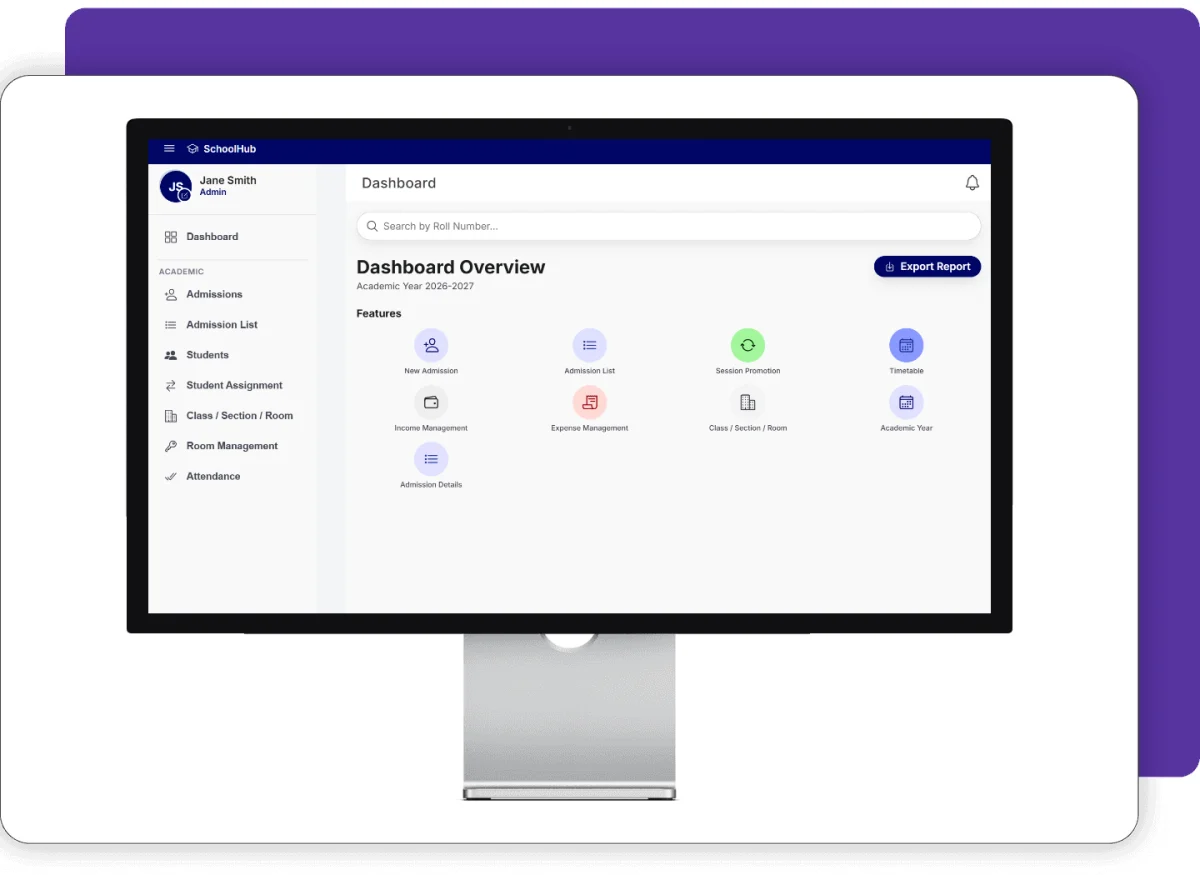
SchoolHub school management software dashboard

Screenshots

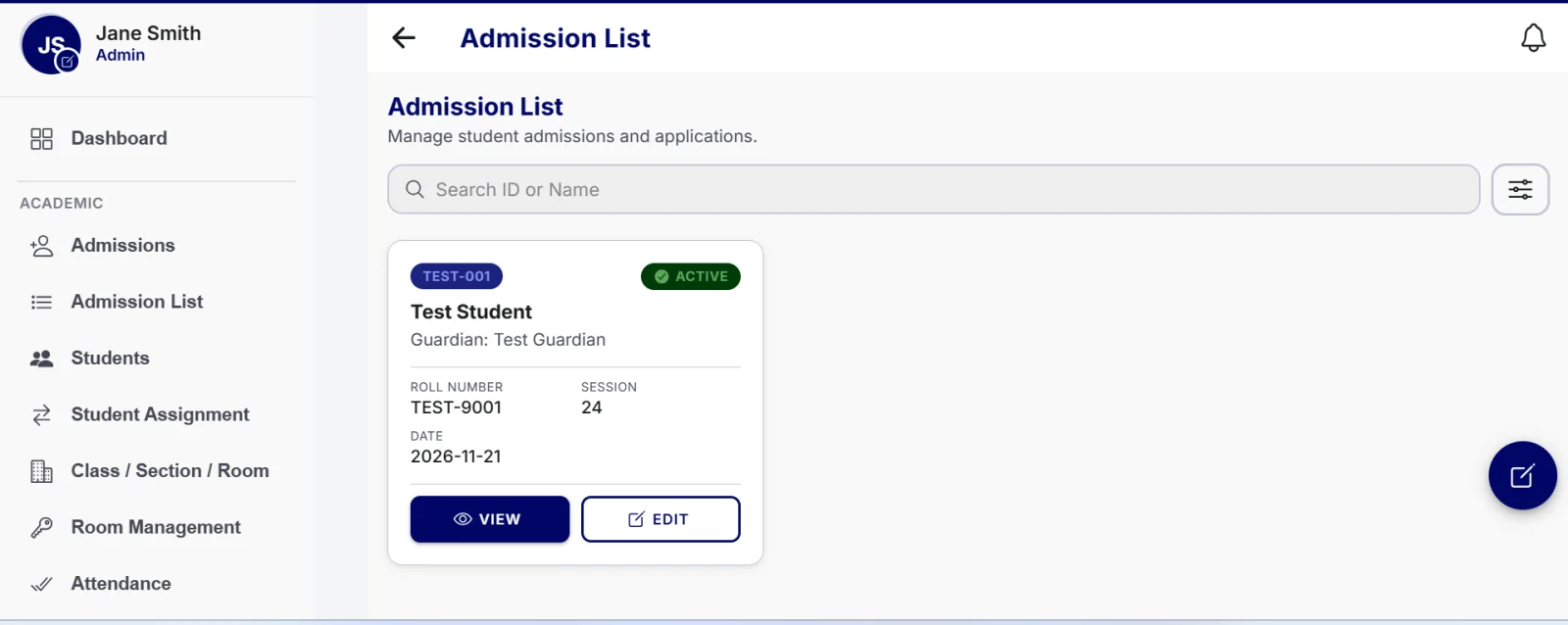
Admission list with student ID, roll number and session in SchoolHub school management software
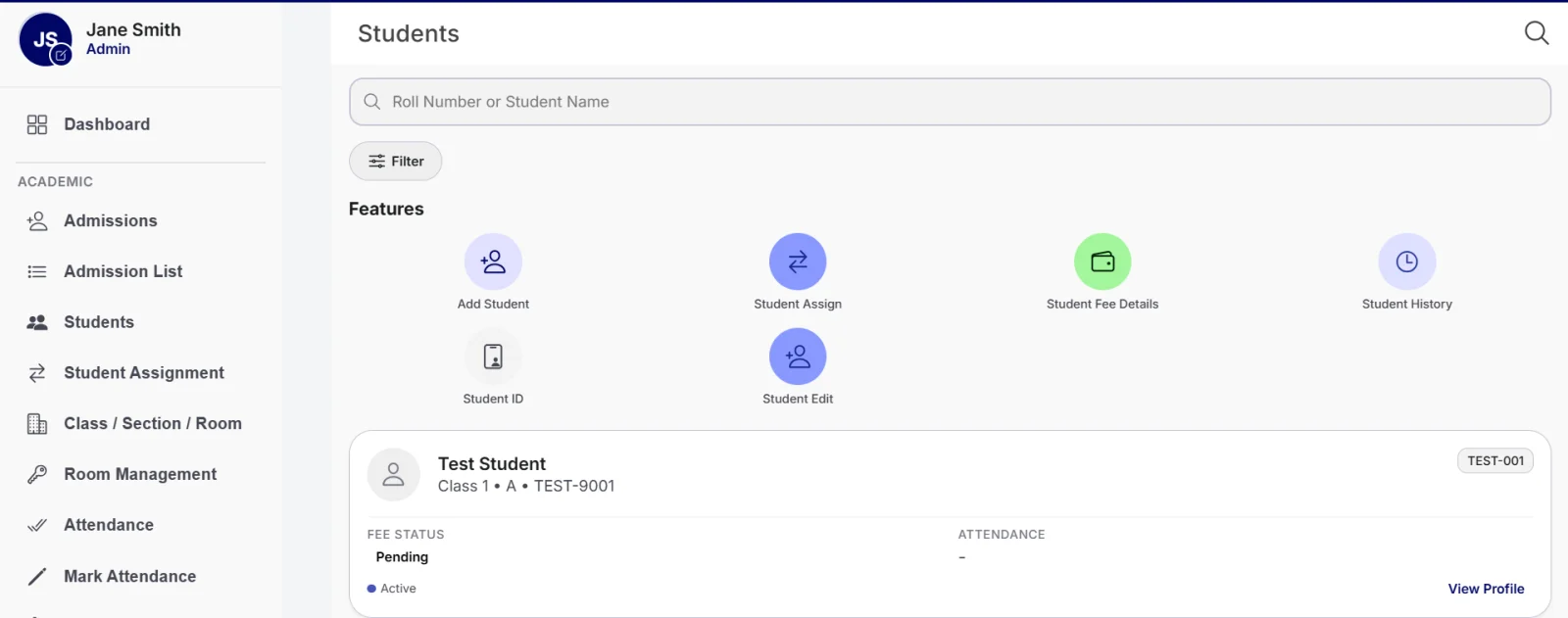
Student list with fee status and attendance in SchoolHub
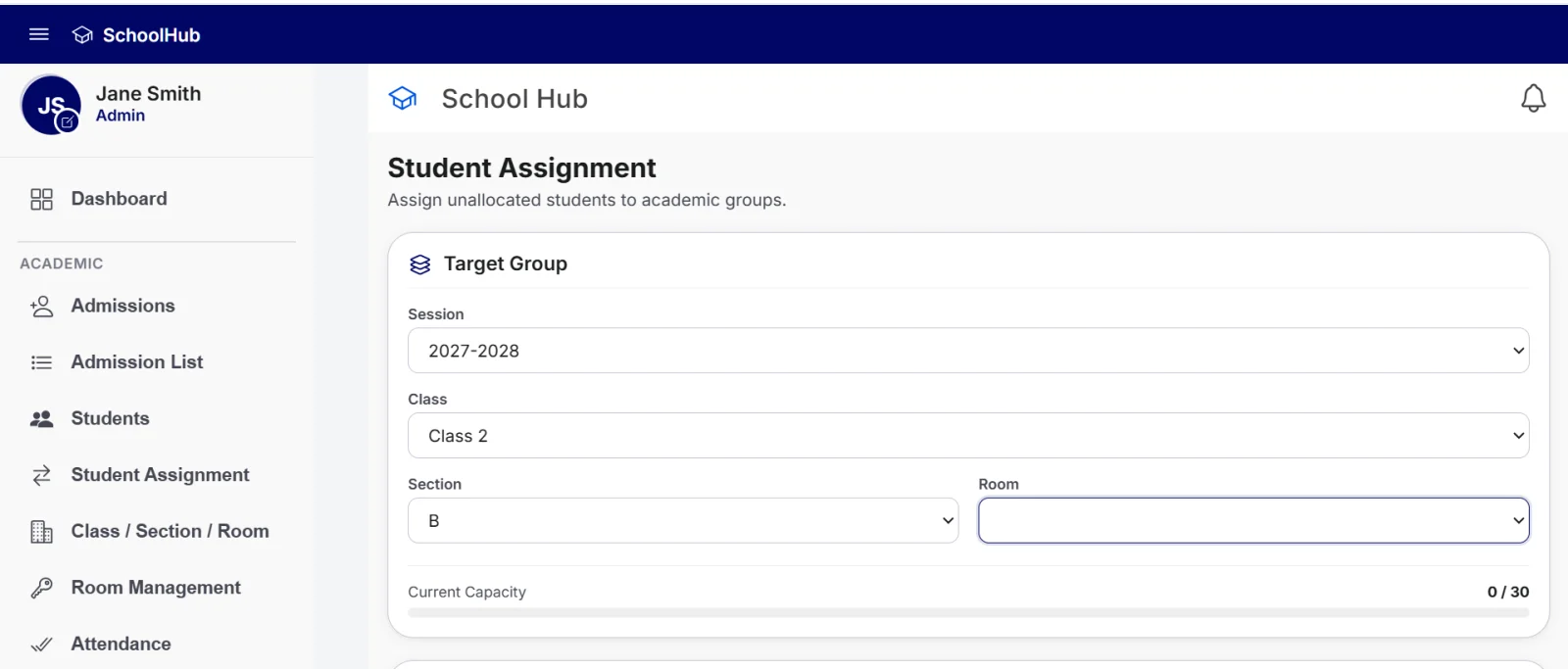
Student assignment to session, class, section and room in SchoolHub
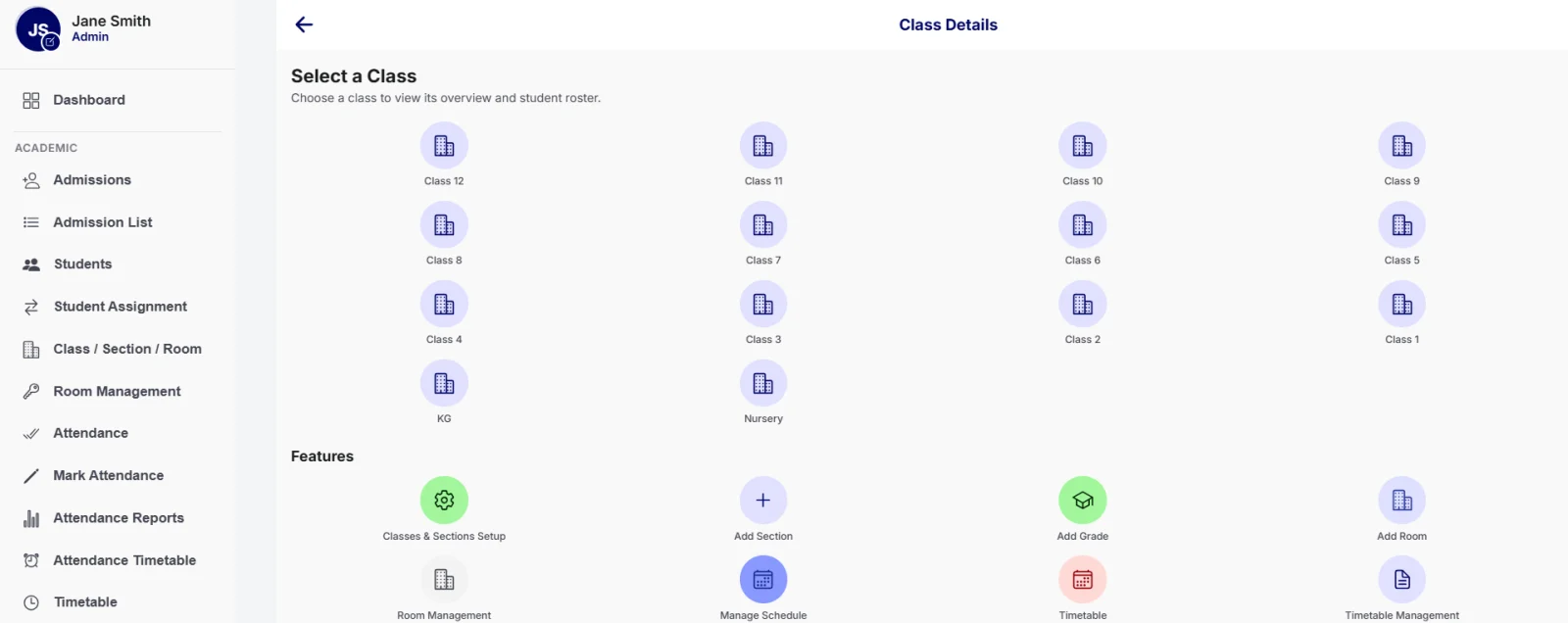
Class selection from Nursery to Class 12 with class and room setup in SchoolHub
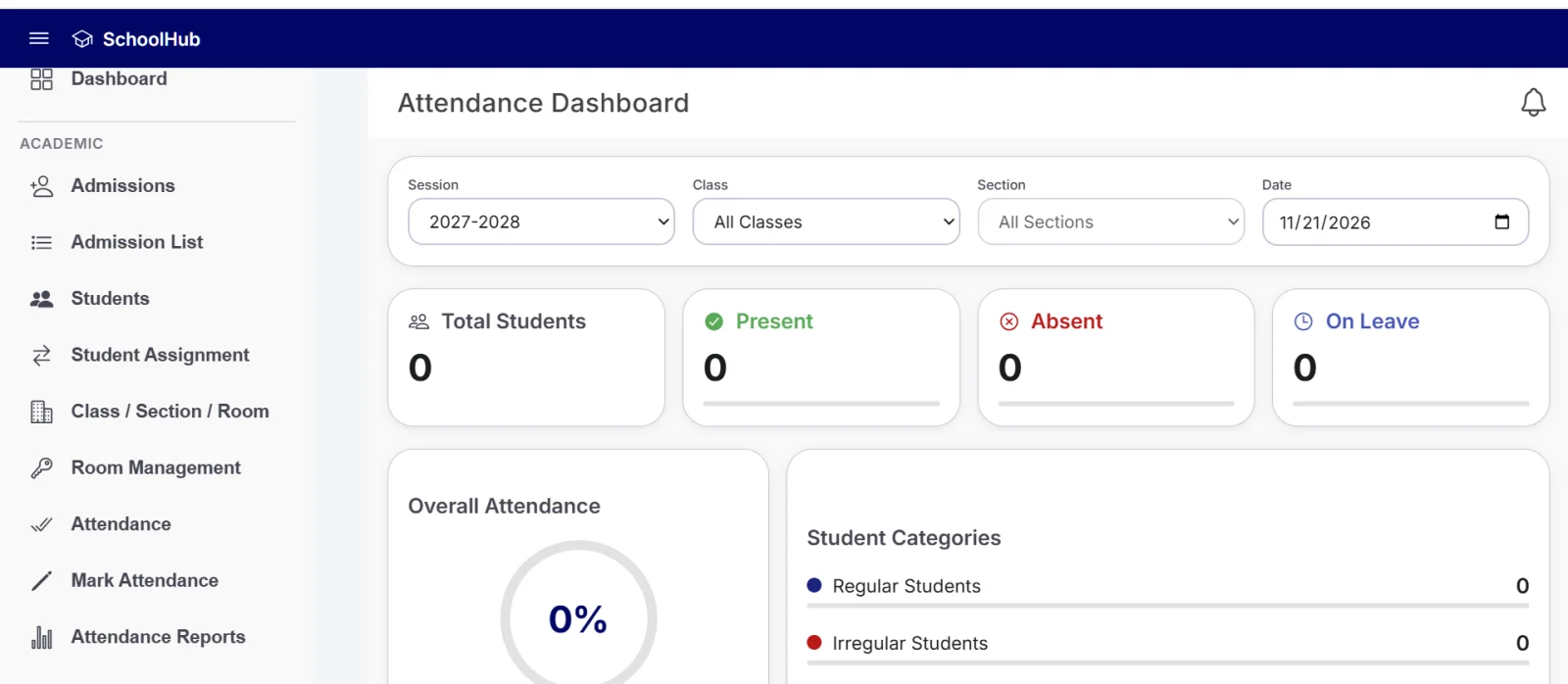
Attendance dashboard with present, absent and on leave counts in SchoolHub student attendance software
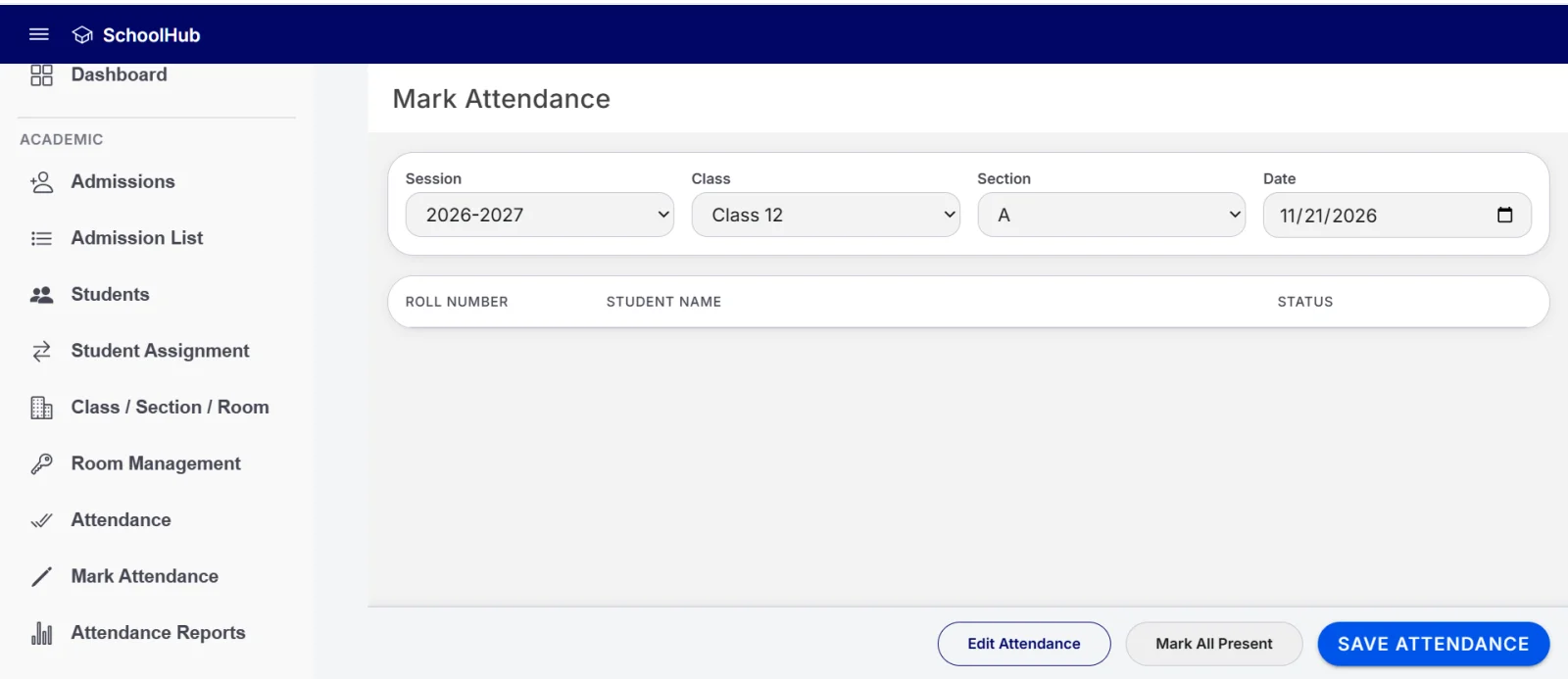
Mark attendance screen by session, class, section and date in SchoolHub
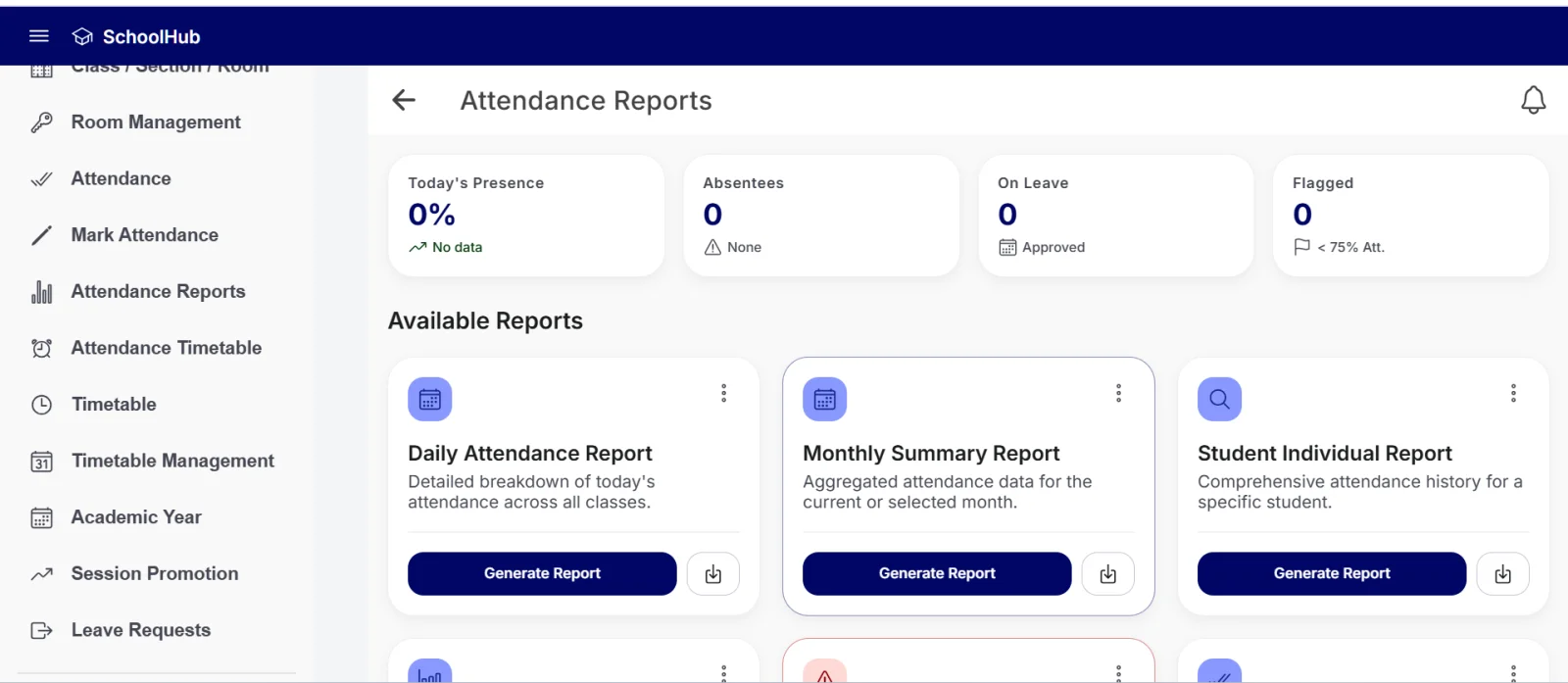
Attendance reports with daily, monthly and low attendance warnings in SchoolHub
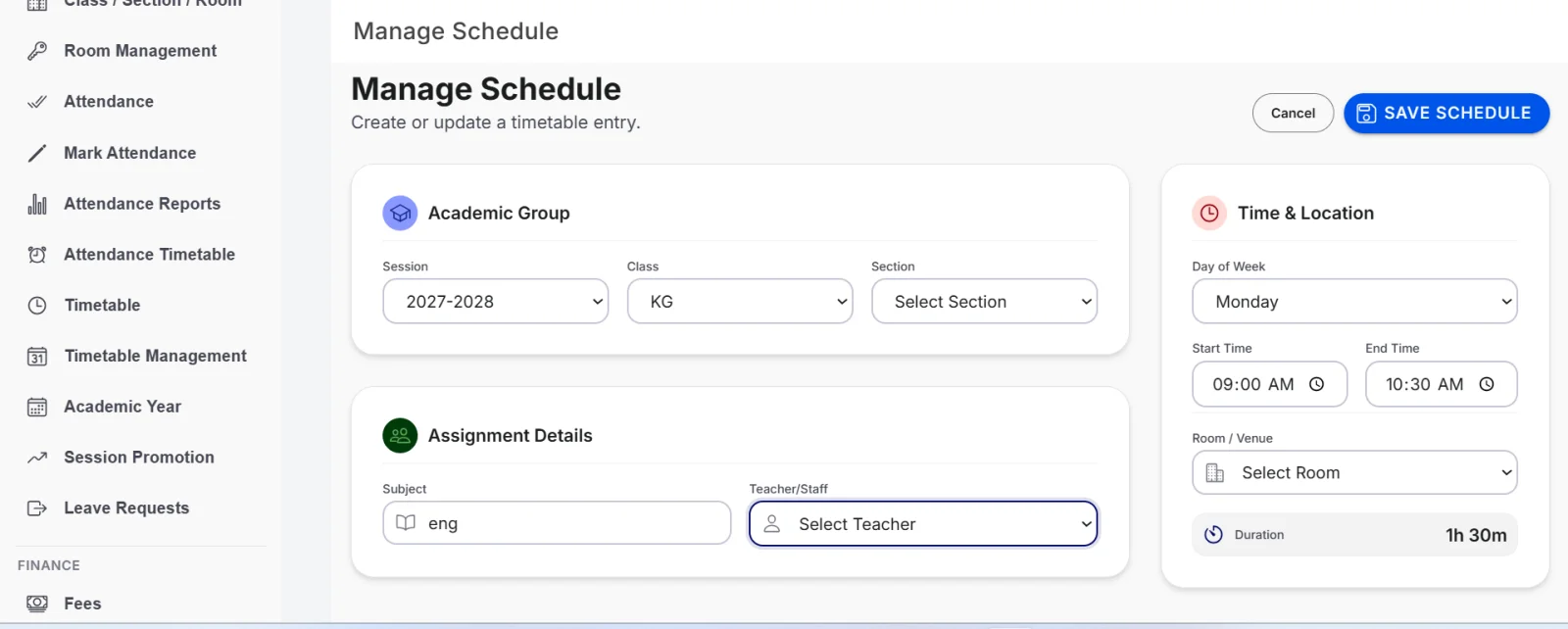
Manage schedule screen for school timetable management in SchoolHub
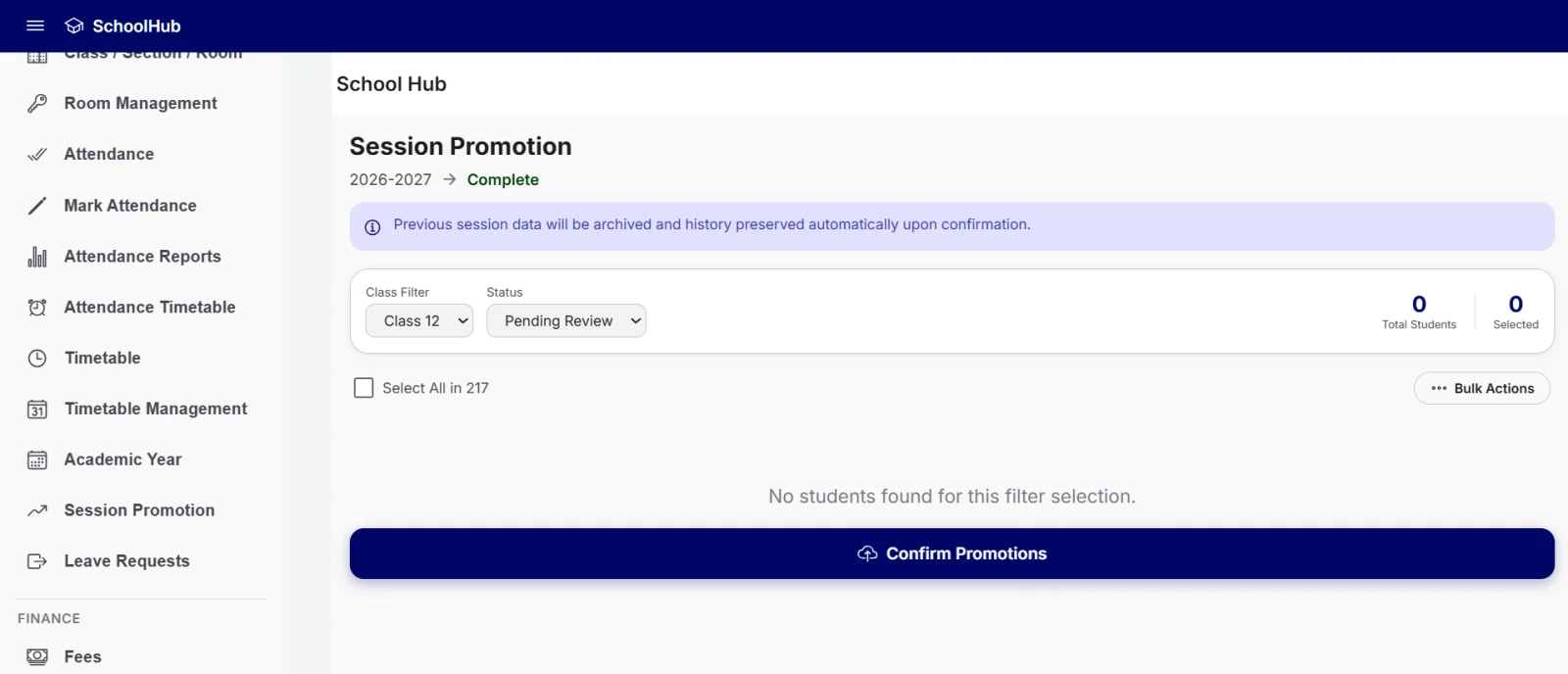
Session promotion screen to move students to the next session in SchoolHub
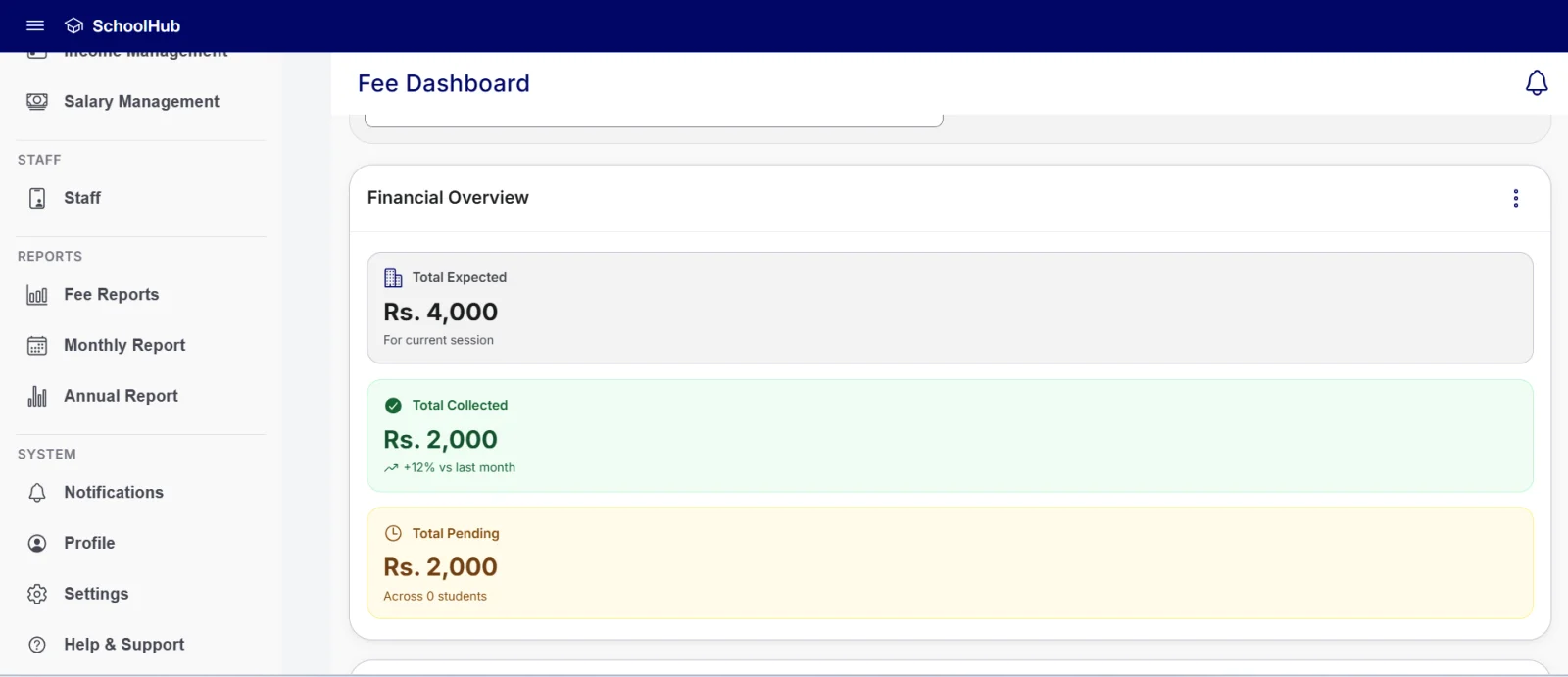
Fee dashboard with total expected, collected and pending fees in SchoolHub school fee management software
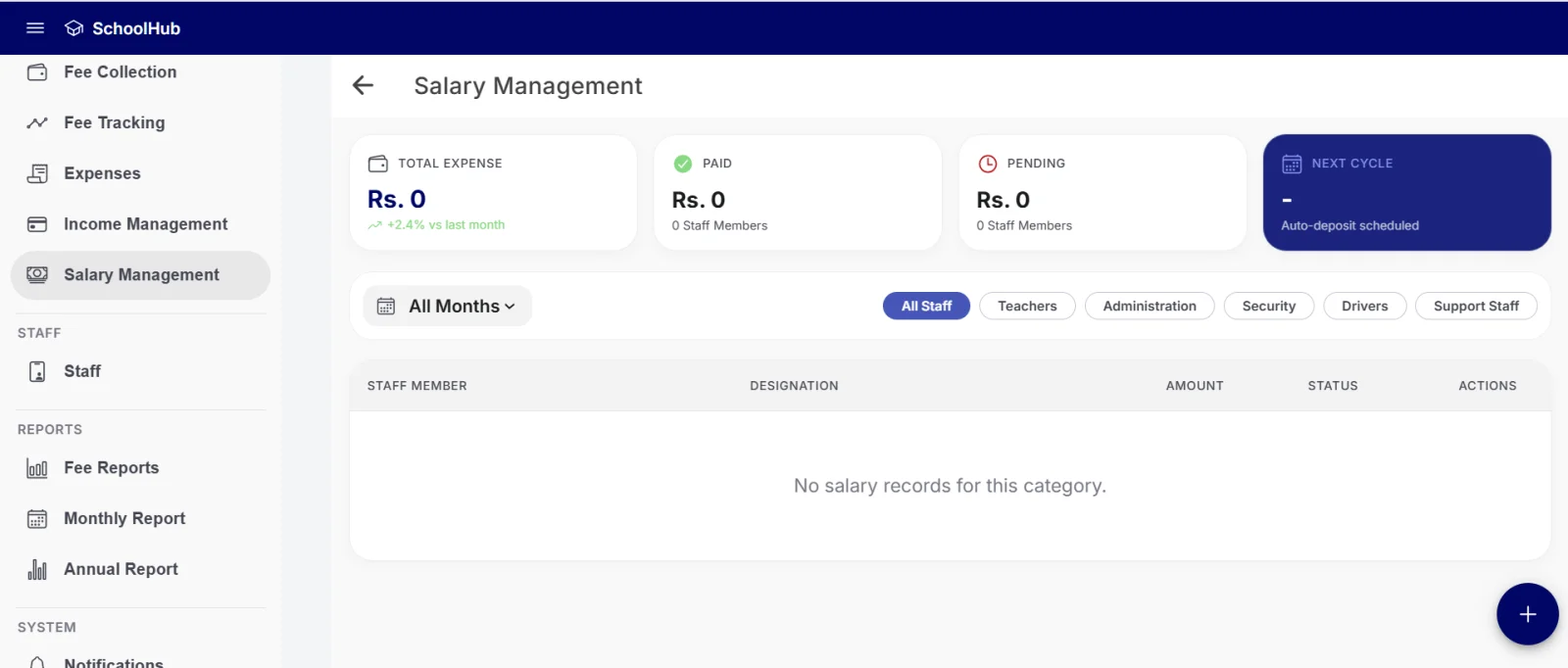
Staff salary management with paid and pending amounts in SchoolHub
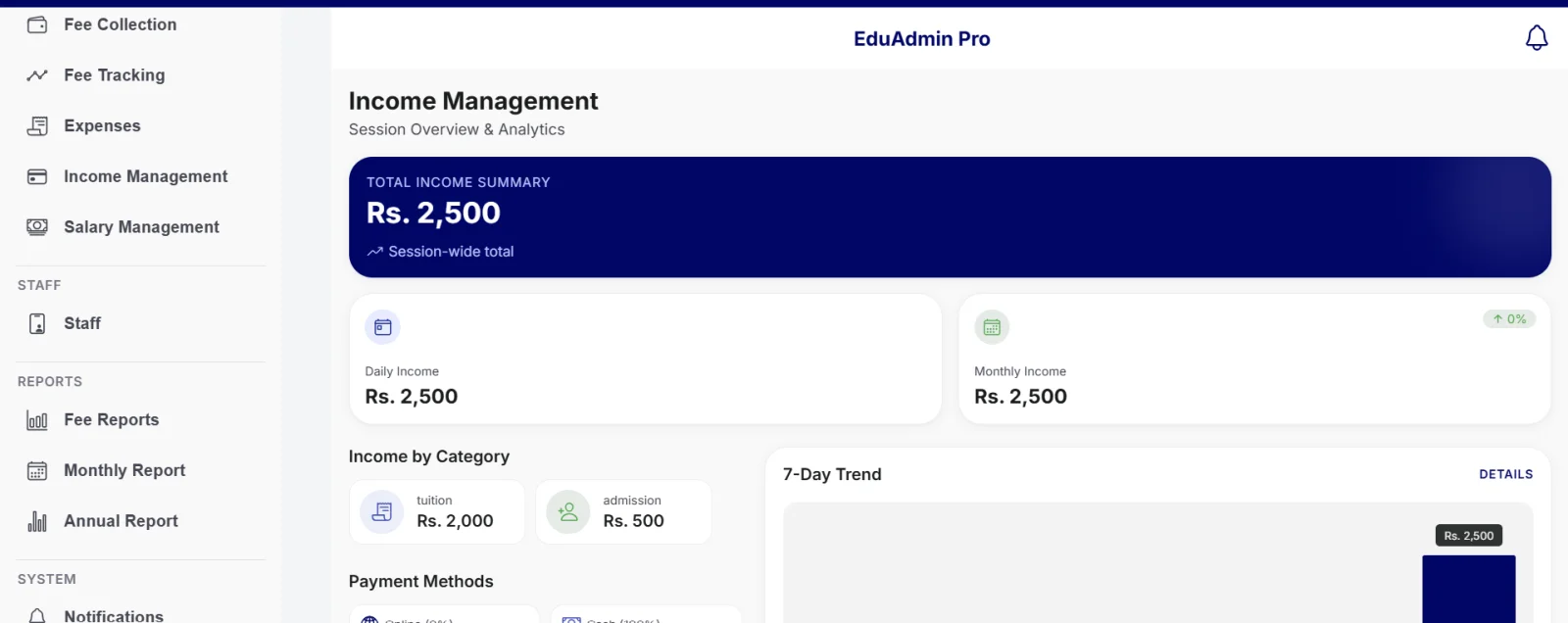
Income management with income by category and 7-day trend in SchoolHub

Who SchoolHub Is For

SchoolHub is school administration software made for school administrators and management teams who handle admissions, fees, attendance and staff records every day. It suits schools that want student data, fee records and reports in one place instead of scattered files, and that want to work on a desktop computer or on mobile.

School administrators

Who handle admissions, fees, attendance and staff records every day.

Management teams

Who want student data, fee records and reports in one place instead of scattered files.

Schools on desktop and mobile

That want to work from a computer or from a phone.

SchoolHub at a Glance

Features of SchoolHub School Management Software

From admissions and attendance to fees, finance, staff and reports, see how each part of SchoolHub helps you run your school. Choose a tab to read more.

Admissions and Student Management

SchoolHub works as a complete school admission management software and student information system. Every student record starts with the admission form and stays connected to the class, section, fees and attendance.

New Admission Form

The admission form is divided into clear sections:

  • Administrative details: admission number, roll number, admission date, academic session, class and section.
  • Student information: full name, date of birth, gender and B-Form / CNIC number.
  • Guardian and contact: father or guardian name, primary phone and residential address.
  • Academic history and fees: previous school (optional), initial admission fee and first month fee. The first month fee is taken from the class monthly fee and can be edited if a student's first month is different.

Document Upload

Documents can be attached during admission: student photo, B-Form / CNIC, birth certificate, previous school certificate and guardian document (up to 5 MB per file).

Admission List and Admission Details

The Admission List shows all admissions and can be searched by ID or name. Each admission opens into a details page with administrative information, student profile, fee summary and uploaded documents, where more documents can be added.

Student Profile

Enter a roll number to open a student's profile. The profile is organised into tabs:

  • Profile: academic info (session, class, section, room, admission date), guardian info, contact info and personal info.
  • Documents: the student's uploaded documents.
  • Fee: month-wise fee records with Paid or Pending status.
  • Attendance: attendance record.
  • Leave: leave requests of the student.
  • History: a timeline of admission and fee payments.

Student List, Edit and Assignment

The Students section includes the student list with filters, Add Student, Student Assign, Student Fee Details, Student History, Student ID and Student Edit. With Student Edit, a student is fetched by roll number and details such as photo, name, B-Form / CNIC, class, section, room, guardian name, phone and address can be updated (the roll number stays fixed).

With Student Assignment, students who are not yet placed can be assigned to a session, class, section and room. The screen shows the room's current capacity and the number of selected students before you confirm.

Class, Section and Room Management

SchoolHub organises the campus structure so students are always placed in the right group.

  • Classes: view any class, from Nursery and KG to Class 12, with its overview and student roster.
  • Add Grade / Class: set the grade name, academic stream (General, Science or Arts), monthly fee and admission fee.
  • Add Section: choose the class, section name, class teacher from the staff list, capacity and an optional room.
  • Add Room: register a room with its name or number, type (classroom, laboratory, library, lecture hall or staff office), maximum capacity and building or floor.
  • Room Management: view all rooms, available rooms, occupied rooms and science labs.

Attendance and Leave Management

SchoolHub works as student attendance software for daily marking and reporting.

Mark Attendance

Select the session, class, section and date. The attendance sheet lists each student with roll number, name and status.

Attendance Reports

The summary cards show today's presence, absentees, students on leave and students flagged below 75 percent attendance. Six reports are available:

  • Daily Attendance Report
  • Monthly Summary Report
  • Student Individual Report
  • Class-wise Performance
  • Low Attendance Warnings (students below the 75 percent threshold)
  • Leave Utilization Report

Attendance Timetable and Leave Requests

The Attendance Timetable shows today's scheduled classes with a link to the full timetable. Leave Requests are organised in Pending, Approved and Rejected tabs.

Timetable Management

The timetable section lets you view and filter school timetables by session, class, section (A, B, C) and day, from Monday to Saturday.

Timetable and schedule management are also reachable directly from the Class, Section and Room area.

Academic Year and Session Promotion

Academic Year

Create or update academic sessions with a session name, start date, end date and status: Upcoming, Active or Completed. Quick pick options help you set sessions faster.

Session Promotion

When a session ends, SchoolHub supports moving students to the next session. Filter students by class and status (Pending Review, Promoted or Held), select students and use bulk actions.

Previous session data is archived and history is preserved automatically after confirmation.

Fee Management

SchoolHub works as school fee management software that connects fee setup, collection and tracking.

Fee Structure

Manage fee types and their status (active or inactive), with a total, active and inactive count. Available fee types are:

  • Tuition Fee: monthly class fee, always billed every month.
  • Admission Fee: charged once at admission, amount taken from each class's admission fee.
  • Late Fee / Fine: added automatically when a payment is made after the due date.
  • Transport, Exam, Library, Lab and Sports Fee: optional fees that can be switched on.
  • Add New Fee Type: create your own fee type with a name, description, monthly amount and active status.

Fee Collection

This works as school fee collection software. Enter a student's roll number to fetch the student profile and the fee breakdown for the month: monthly tuition fee, previous due and total payable. Choose the payment method (Cash, Bank or Online) and process the payment. A successful payment marks the fee as Paid.

Active fee types are added to every student's fee challan and fee collection. Inactive ones are not applied.

Fee Tracking

Filter fees by session, class, section and status (Paid, Pending or Overdue). The tracking screen shows total students and counts of paid, pending and overdue records, with roll number, student name, fee month, amount due and status in the table.

Income, Expense and Salary Management

Income Management

See total income for the session, daily income and monthly income, income by category, payment methods (online and cash), a 7-day trend and recent transactions.

Expense Management

This school expense management software records institutional expenses by category (electricity, salaries, maintenance, events and others) with amount, date, reference or voucher number, description and a receipt upload (SVG, PNG, JPG or PDF up to 10 MB).

The expense screen shows total expenses, paid and scheduled amounts, budget remaining, utilisation and the top category, with filters for category and status.

Salary Management

Track staff salaries with total expense, paid and pending amounts and the next cycle. Filter salary records by month and staff group: teachers, administration, security, drivers and support staff.

Staff Management

The Staff Directory keeps teaching, administration and support staff in one list, with filters for each group. Adding a staff member covers:

  • Personal information: full name, father or guardian name, email, contact number and address.
  • Professional information: staff ID, department, designation, date of joining and annual base salary.
  • Status and documents: account status (Active, Inactive / On Leave or Probation) and supporting documents such as resume, ID and certifications (up to 10 MB per file).

Class teachers selected from the staff list can be assigned when you create a section.

Dashboard and Reports

Dashboard

The dashboard shows the academic year and quick shortcuts to New Admission, Admission List, Session Promotion, Timetable, Income Management, Expense Management, Class / Section / Room and Academic Year.

Summary cards show total students, new admissions, attendance and total staff. The financial overview shows total income, total expenses and net income, with an income versus expenses chart. Students can be searched by roll number, and reports can be exported from the dashboard.

Reports

The reports hub covers Monthly, Annual, Attendance, Fee, Expenses, Income, Admissions and Staff reports, with a list of recently generated reports.

  • Monthly Report (PDF download): students overview, attendance statistics, student behaviour (regular and irregular), fee summary, staff and expenses, and a final reconciliation of income against expenses.
  • Annual Report (PDF download and share): annual net income, student summary (starting, ending, new admissions and withdrawals), class-wise breakdown, attendance, staff and payroll, fee summary, and revenue and expense breakdown.

School Setup, Security and Support

School Setup

Set the school name and currency, review academic sessions, choose which classes and sections the school uses, set each class's monthly fee and admission fee, and decide which extra fees (Transport, Exam, Library, Lab, Sports and Late Fee) apply. A class or section that already has students cannot be removed.

The default currency is PKR, and other currencies (USD, GBP, EUR, AED, SAR, INR and BDT) can be selected.

Security and Account

Admin profiles include a two-factor authentication option (require a code at login) and password change. The login page states a secure connection with 256-bit encryption.

Notifications and Help and Support

Notifications are grouped into Finance, Attendance, Academic and System. Help and Support covers Fee Management, Student Admissions, Attendance and Staff Payroll.

How SchoolHub Fits Daily School Work

Set up the school

Add the school name and currency, choose classes and sections, and set class fees in School Setup.

Create the academic session

Add the session with its start and end dates.

Add staff and rooms

Register staff, rooms and sections with class teachers.

Admit students

Fill in the admission form, upload documents and collect the admission fee and first month fee.

Place students in classes

Assign students to class, section and room.

Mark attendance daily

Record attendance and review the attendance reports.

Collect and track fees

Collect fees by roll number and watch pending and overdue records.

Record income, expenses and salaries

Keep the school's money flow in one place.

Review reports

Use the dashboard, monthly report and annual report.

Promote students

Move students to the next session at the end of the year.

Why Schools Use SchoolHub

One workspace for the whole campusAdmissions, attendance, fees, staff and reports are connected, not separate.
Clear fee visibilityPaid, pending and overdue records are easy to filter by session, class and section.
Organised student recordsEvery student has a profile with documents, fee history, attendance and leave in one place.
Session-wise structureAcademic sessions, class promotion and archived history keep each year organised.
Ready reportsMonthly and annual reports can be downloaded as PDF.
Account protectionOptional two-factor authentication for admin login.

Platform: Desktop and Mobile

SchoolHub is school management software for Pakistan, available as a desktop application and as a mobile app, so school administrators can manage the entire school from a computer or from their phone.

Frequently Asked Questions

SchoolHub is a desktop school management software for admissions, student records, attendance, fee collection, staff, income, expenses and reports.

Yes. SchoolHub is available as a desktop application, and it is also available as a mobile app.

You can manage admissions, students, classes, sections, rooms, attendance, leave requests, timetables, academic sessions, session promotion, fees, income, expenses, staff salaries and reports.

Yes. Fee Tracking shows paid, pending and overdue records, and you can filter them by session, class and section.

Tuition fee, admission fee and late fee are built in. Transport, exam, library, lab and sports fees can be switched on, and you can add your own fee type.

You select the session, class, section and date, then mark each student's status. Six attendance reports are available, including low attendance warnings for students below 75 percent.

PKR is the default. You can also select USD, GBP, EUR, AED, SAR, INR or BDT in School Setup.

Yes. The monthly report and the annual report can be downloaded as PDF.

Yes. Admin accounts have an option to require a code at login.

Yes. Session Promotion lets you filter students by class and status, select students and use bulk actions. Previous session data is archived and history is preserved.

Run Your School from One Dashboard

If you want admissions, attendance, fee collection, staff records and reports in one desktop school management system, SchoolHub brings them together in a simple workspace. Contact our team to learn more about SchoolHub for your school.

Book a Free Demo
WhatsApp Us