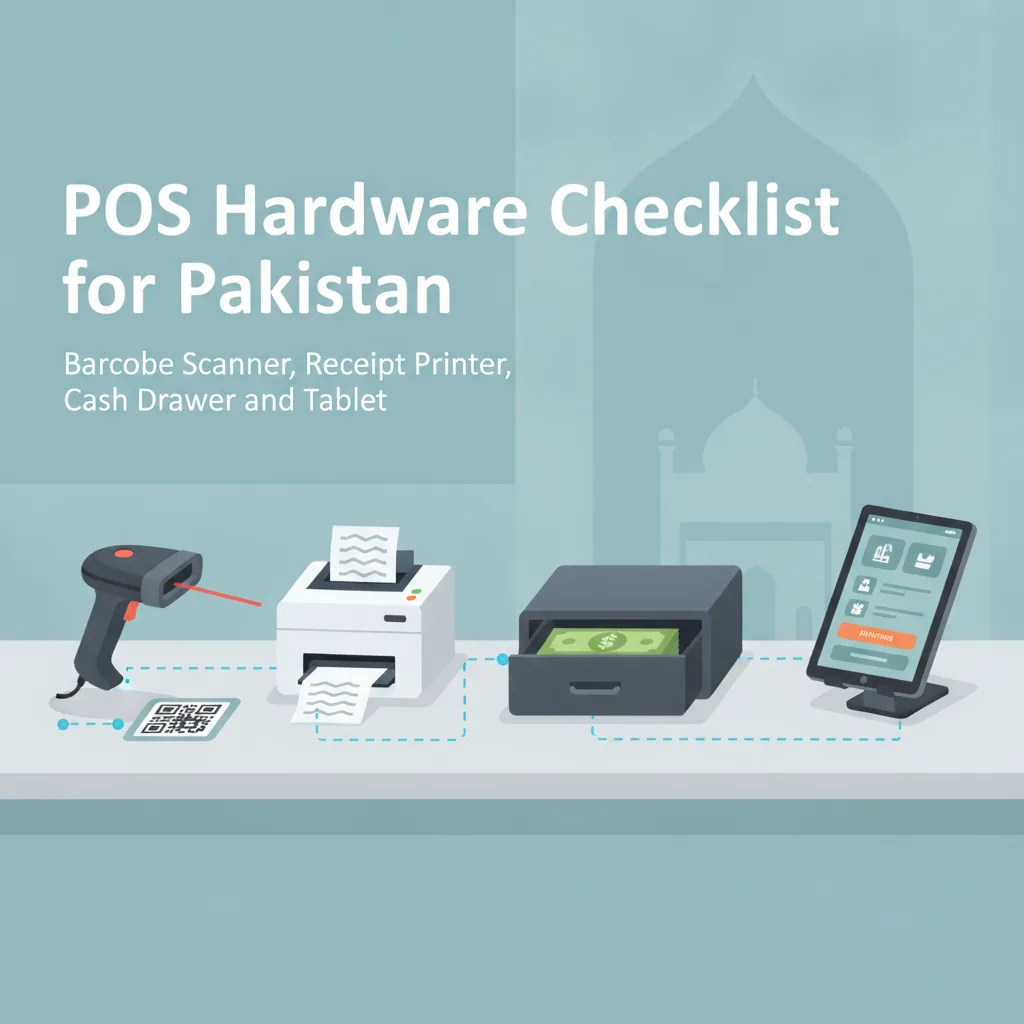
POS Hardware Checklist for Pakistan: Barcode Scanner, Receipt Printer, Cash Drawer and Tablet
Setting up a retail or hospitality billing counter in Pakistan does not require overpriced proprietary hardware. This practical checklist details how to choose the right barcode scanner, thermal receipt printer, cash drawer, and tablet or screen without costly mistakes.
In this article
- 1. The Screen: Tablet, Desktop PC, or Touch Terminal?
- Tablet (Android or iPad)
- Desktop PC or All-in-One Computer
- 2. Barcode Scanners: 1D vs. 2D and Wired vs. Wireless
- 1D Laser / CCD Scanners
- 2D Area Imager Scanners
- Form Factor & Connectivity Checklist:
- 3. Receipt Printers: Thermal Printing Essentials
- 58mm (2-Inch) vs. 80mm (3-Inch) Width
- Key Features to Verify Before Purchasing:
- 4. Cash Drawers: Security and Mechanism
- Essential Specifications for Pakistani Currency:
- The Master POS Hardware Checklist for Pakistan
- How CloudPOS Simplifies Your Hardware Choices
- Make an Informed Hardware Investment
Opening a new retail shop, pharmacy, boutique, or cafe in Pakistan comes with a long list of upfront expenses, and a clear POS hardware checklist for Pakistan keeps that list under control. When shop owners begin sourcing equipment from commercial markets like Hafeez Centre in Lahore, Techno City in Karachi, or Singapore Plaza in Rawalpindi, vendors frequently push expensive, proprietary "all-in-one POS terminals." These bulky machines often cost upwards of Rs. 120,000 to Rs. 200,000, rely on outdated internal components, and leave you stranded if an integrated screen or motherboard burns out during a voltage spike.
You do not need a locked-down, overpriced terminal to build a fast and reliable cash counter. Modern cloud point-of-sale systems allow you to assemble a flexible counter using independent, readily available components. This guide provides a practical POS hardware checklist for Pakistan: barcode scanner, receipt printer, cash drawer and tablet, breaking down what is essential, what is optional, and exactly what to verify before making a purchase.
1. The Screen: Tablet, Desktop PC, or Touch Terminal?
The screen is the command center of your checkout counter. Before buying expensive hardware, evaluate your store's footfall, counter space, and power infrastructure.
Tablet (Android or iPad)
For modern retail outlets, cafes, clothing boutiques, and salons, a 10-inch or 11-inch tablet mounted on an ergonomic counter stand has become the preferred choice across Pakistan. Tablets offer distinct advantages:
- Low power consumption: During prolonged load shedding or generator switchovers, a tablet continues running on its internal battery for 6 to 10 hours without dropping a single active customer transaction.
- Compact footprint: Frees up valuable counter space for product displays or impulse-buy items.
- Portability: Staff can carry the tablet across the floor for inventory counts or line-busting during peak hours.
What to check before buying: Choose a tablet with at least 4GB of RAM and an octa-core processor to ensure smooth performance while running browser-based apps or dedicated POS software. Look for dual-band Wi-Fi (2.4GHz / 5GHz) for reliable local connectivity.
Desktop PC or All-in-One Computer
If you operate a busy mini-mart, wholesale godown, or high-volume supermarket with continuous scanning, a traditional desktop PC or a fanless all-in-one desktop computer remains a rugged workhorse. They easily accommodate multiple wired USB peripherals (scales, handheld scanners, desktop presentation scanners, customer-facing pole displays) without requiring USB-OTG adapters.
What to check before buying: Ensure you install a reliable Uninterruptible Power Supply (UPS) or pure sine-wave inverter dedicated to the billing counter so sudden power cuts do not corrupt your local databases or shut down active billing.
2. Barcode Scanners: 1D vs. 2D and Wired vs. Wireless
A barcode scanner eliminates pricing errors and dramatically accelerates checkout speed. However, buying the wrong model can lead to frustrating scan delays at the till.
1D Laser / CCD Scanners
1D scanners read standard linear barcodes (such as UPC and EAN-13 codes found on packaged consumer goods, beverages, and cosmetics). They are affordable and reliable for basic retail, but they cannot read barcodes displayed on glossy smartphone screens or damaged, crinkled plastic packaging.
2D Area Imager Scanners
2D scanners use a camera sensor to capture images of both traditional barcodes and 2D codes (such as QR codes and Data Matrix codes). They can read codes off mobile screens, damaged vendor labels, and curved medicine bottles. As digital QR payments, customer loyalty apps, and e-invoices expand across Pakistan, a 2D scanner is an investment that protects your counter setup from becoming outdated.
Form Factor & Connectivity Checklist:
- Handheld Wired (USB): The most reliable, budget-friendly option for general retail counters. No batteries to charge and zero wireless interference.
- Desktop / Hands-Free Omnidirectional Scanner: Essential for grocery stores and pharmacies where the cashier needs both hands free to slide items rapidly across the scanning window.
- Wireless / Bluetooth: Ideal for furniture showrooms, wholesale warehouses, or auto parts shops where staff must scan heavy, bulky items resting on carts or pallets.
- Durability rating: Confirm the scanner has an IP54 drop-resistance rating, ensuring it survives repeated drops onto hard tile or concrete floors.
3. Receipt Printers: Thermal Printing Essentials
Inkjet and dot-matrix printers have largely been phased out at the point of sale in favor of direct thermal printers. Thermal printers require no ink, ribbon, or toner—only heat-sensitive thermal paper rolls—resulting in quiet operation, near-instant printing, and minimal maintenance.
58mm (2-Inch) vs. 80mm (3-Inch) Width
- 58mm Printers: Compact and economical, these work well for small kiosks, juice bars, home delivery riders, and pop-up stalls where receipts only need a few lines (store name, date, total amount).
- 80mm Printers: The undisputed standard for supermarkets, department stores, pharmacies, and restaurants. The 3-inch roll width provides sufficient space for detailed item descriptions, unit rates, batch or serial numbers, return policies, and clear QR codes.
Key Features to Verify Before Purchasing:
- Auto-Cutter vs. Tear Bar: Always opt for an 80mm model with an automatic guillotine cutter rated for at least 1.5 million clean cuts. Manual tear bars slow down the cashier and often lead to jammed paper feeds during peak rushes.
- Interface Ports: For single-counter setups using a PC, a standard USB interface is straightforward. For tablet POS setups or restaurants routing orders directly to a kitchen printer, choose a model with an Ethernet (LAN) or Wi-Fi port so multiple billing devices can trigger print jobs over your local network.
- Cash Drawer Kick-Out Port (RJ11/RJ12): Verify that the printer includes an RJ11/RJ12 modular jack on the back panel to send the opening signal to your cash drawer.
- ESC/POS Protocol Support: Ensure the printer supports standard industry ESC/POS commands so it works out-of-the-box with modern web and cloud POS systems without proprietary drivers.
4. Cash Drawers: Security and Mechanism
Cash remains the primary transaction medium for retail across Pakistan. A flimsy cash drawer poses a theft risk and leads to frequent mechanical jams that stall the checkout line.
Essential Specifications for Pakistani Currency:
- Compartment Layout: Pakistani Rupee notes (Rs. 10, 20, 50, 100, 500, 1000, and 5000) demand adequate partition space. Choose a drawer with at least 4 to 5 adjustable bill compartments with sturdy metal spring clips, along with 5 to 8 coin cups.
- Printer-Driven (RJ11/12) vs. Manual Key-Only: A printer-driven drawer connects directly to your thermal receipt printer via a standard telephone-type cable. When a cash sale completes, the software triggers the printer, which pops the drawer open automatically. This prevents cashiers from leaving the till unlocked between transactions.
- 3-Position Key Lock: Ensure the lock offers three distinct states: locked closed (secure when leaving counter), automated opening via printer pulse, and manual emergency key override (crucial if power is completely cut).
- Steel Ball-Bearing Rollers: Cheap plastic roller tracks warp under heavy cash weights and hot weather. Insist on heavy-gauge steel construction with steel ball-bearing slides rated for at least 1,000,000 cycles.
The Master POS Hardware Checklist for Pakistan
Use this quick reference checklist when reviewing vendor quotations or sourcing hardware across local markets:
- Display / Core Device:
- Android tablet (4GB+ RAM, 10"+ screen) or standard desktop PC
- Sturdy 360-degree rotating tablet counter stand with locking bracket
- Dedicated power supply or UPS power backup suited for local grid instability
- Receipt Printer:
- 80mm (3-inch) direct thermal printer with automatic cutter
- USB + Ethernet (LAN) connectivity for flexible placement
- RJ11/12 port for cash drawer integration
- ESC/POS command compatibility
- Barcode Scanner:
- 2D imager scanner (reads printed labels and smartphone screens)
- Hands-free stand or omnidirectional presentation scanner for high-speed checkout
- USB interface (or Bluetooth if warehouse portability is required)
- Cash Drawer:
- Heavy-duty metal construction with steel ball-bearing slides
- Minimum 4 or 5 bill slots compatible with PKR 5000/1000 notes
- RJ11/12 printer kick cable included
- 3-position key lock with dual emergency backup keys
- Auxiliary Peripherals (Optional depending on business type):
- Thermal barcode label printer (for apparel, jewellery, and custom shelf tags)
- Electronic digital weighing scale with serial/USB connection (for sweets, dry fruit, and grocery produce)
- Customer-facing display or secondary screen for price transparency
How CloudPOS Simplifies Your Hardware Choices
One of the biggest pitfalls retailers face is investing in specialized software that only works on expensive, single-brand hardware. CloudPOS is designed from the ground up to be hardware-agnostic, giving Pakistani businesses total freedom over their setup.
Because CloudPOS operates seamlessly across desktop computers, tablets, and smartphones, you can launch a billing station using hardware you already own or buy off-the-shelf equipment from any local technology market. Key platform capabilities that complement your hardware include:
- True Online and Offline Billing: Internet disruptions are common across Pakistan. CloudPOS allows cashiers to continue scanning barcodes, opening cash drawers, and printing thermal receipts offline without interruption. All data syncs automatically to secure cloud servers the moment the connection returns.
- Universal Peripheral Compatibility: CloudPOS connects effortlessly with standard USB, Bluetooth, and network thermal receipt printers (both 58mm and 80mm), 1D/2D barcode scanners, and auto-kick cash drawers.
- Multi-Store Inventory Management: Whether running a single counter or a chain of branches across multiple cities, your inventory and low-stock alerts sync centrally, allowing you to check stock levels without visiting the godown.
- Employee Shift Controls: Prevent cash discrepancies with built-in staff access control, shift closing reports, and individual sales tracking directly through your cash drawer management.
- Built-in Invoicing Flexibility: Easily handle local digital invoicing, tax configurations, and FBR-integrated billing if your business category requires fiscal compliance, all through the same streamlined checkout screen.
For a general overview of how point of sale systems are structured, see this point of sale overview.
Make an Informed Hardware Investment
Buying hardware for your store counter does not have to be an intimidating or exorbitant process. By sticking to open-standard components—an 80mm thermal printer, a responsive 2D scanner, a durable multi-slot cash drawer, and an affordable tablet or PC—you protect your business from costly lock-ins, excessive power bills, and operational downtime.
Before you commit to thousands of rupees in hardware purchases, see how modern software operates on real-world retail devices. Contact the CloudPOS team to test-drive the platform and explore the ideal hardware configuration for your specific trade.
Ready to upgrade your counter with fast, flexible, and reliable retail software? Book a free CloudPOS demo today or speak directly with our team to configure your store for sustainable growth.
===CONTENT===