Online-Only vs Online-Offline POS in Pakistan: Which Architecture Protects Your Cash Counter?
Pakistani retailers face regular broadband flickers, fiber cuts, and router reboots that can bring customer billing to an abrupt standstill. This comparison evaluates online-only cloud POS, legacy offline desktop software, and modern hybrid online-offline architectures. Discover how each model handles downtime, multi-branch inventory, and data protection so you can choose the right setup for your store.
In this article
- Understanding the Three Core POS Architectures
- 1. Purely Offline Desktop POS (Legacy On-Premise)
- 2. Online-Only Cloud POS (Browser-Based or Thin Client)
- 3. Hybrid (Online + Offline) Cloud POS
- Feature-by-Feature Comparison: How They Perform in Pakistan
- 1. Resilience During Internet Outages
- 2. Multi-Store Visibility and Centralized Inventory
- 3. Data Protection and Hardware Failure
- 4. Checkout Speed and Barcode Responsiveness
- Checklist: Auditing Your Store’s POS Architecture Needs
- Which Architecture Suits Your Business Best?
- Choose Purely Offline Desktop POS If:
- Choose Online-Only Cloud POS If:
- Choose Hybrid (Online + Offline) Cloud POS If:
- How CloudPOS Helps
- The Right Foundation for Long-Term Growth
It is 8:30 PM on a Saturday at a busy retail shop in Lahore’s Gulberg or Karachi’s Tariq Road. The checkout counter is five customers deep, arms stacked with garments and daily essentials. Without warning, the store’s fiber connection drops, or a sudden switch from grid electricity to a UPS inverter resets the Wi-Fi router. The cashier scans the next barcode—and the screen freezes on a revolving loading icon.
For shop managers across Pakistan, this scenario is a recurring nightmare. When billing stalls at peak business hours, queues spill into aisles, impatient shoppers abandon their carts, and front-desk staff scramble with makeshift paper bills. In a competitive retail landscape, the debate between point of sale systems is no longer just about user interfaces or monthly pricing; it comes down to system architecture. Specifically: should you run an online-only cloud POS, stick with a traditional offline desktop program, or deploy a hybrid (online + offline) POS system?
Every architecture represents distinct trade-offs in uptime, security, multi-store visibility, and operational overhead. Below is an honest, practical comparison designed to help Pakistani retailers, restaurateurs, pharmacies, and wholesalers select the right model for their counters.
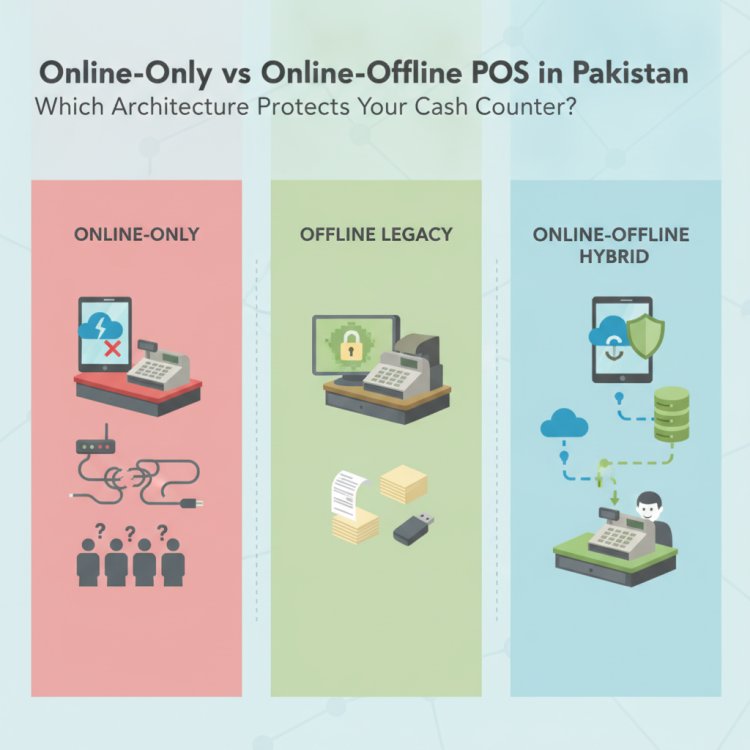
Understanding the Three Core POS Architectures
Before evaluating how these systems perform during peak rush hours, it is helpful to look under the hood at how each handles daily transaction data.
1. Purely Offline Desktop POS (Legacy On-Premise)
A traditional desktop POS runs entirely on a local computer’s hard drive or an internal Local Area Network (LAN) server. The software executes locally, and all transaction logs, customer records, and inventory data sit on that single machine. It does not require an active internet connection to ring up sales, process discounts, or print thermal receipts.
2. Online-Only Cloud POS (Browser-Based or Thin Client)
An online-only cloud POS operates over the web. Every action—scanning an SKU, looking up a customer profile, or closing a register—sends a live request to an offsite server in a remote data center. The user interface functions much like a website or thin client: if the internet connection is active, data updates across the entire company instantly.
3. Hybrid (Online + Offline) Cloud POS
A hybrid cloud POS combines local execution with automated cloud synchronization. In day-to-day operations, the point of sale caches core inventory and customer tables directly on the local terminal (desktop, tablet, or mobile). When the internet is stable, sales sync in real time. If the connection fails, the system switches to offline mode without interrupting the cashier. When internet access resumes, the software queues and uploads the offline receipts automatically to the centralized database.
Feature-by-Feature Comparison: How They Perform in Pakistan
Pakistani retail environments face distinct operating conditions. Between municipal fiber cuts, utility load management, and frequent ISP gateway latency, POS software must withstand unexpected disruptions. Industry reports from the Chainstore Association of Pakistan have noted that retail connectivity status often fluctuates due to infrastructure and ISP-level factors rather than deliberate shop closures. Here is how the three architectures compare across vital store operations.
1. Resilience During Internet Outages
- Purely Offline Desktop: High resilience. Because it never queries an outside server, internet downtime has zero effect on your checkout speed.
- Online-Only Cloud: Zero resilience. If your fiber link snaps or your 4G backup router fails to authenticate, your cash register is locked. Cashiers cannot scan items or look up prices unless a connection is re-established.
- Hybrid (Online + Offline): High resilience. Billing continues uninterrupted. The local terminal processes barcodes, calculates totals, and prints receipts. Customers experience zero delay at the till.
2. Multi-Store Visibility and Centralized Inventory
- Purely Offline Desktop: Extremely weak. Because data is trapped on a local hard disk, an owner cannot see consolidated sales from home or track stock movements between branches. Reconciling inventory across two or three shops requires cashiers to export end-of-day spreadsheets and send them over WhatsApp, leading to duplicate stock entries and administrative headaches.
- Online-Only Cloud: Excellent. All branches read from and write to the same central database. Stock deductions reflect immediately across all terminals.
- Hybrid (Online + Offline): Strong with automated sync. Central reporting and cross-branch inventory stay updated while connections are active. If one branch experiences an internet blackout, its sales sync up the moment the network returns, ensuring total corporate visibility without risking terminal lockouts.
3. Data Protection and Hardware Failure
- Purely Offline Desktop: High operational risk. If the shop computer suffers a hard drive crash, gets infected by malware, or is damaged during an electrical surge, months or years of historical sales and accounting records can vanish instantly. Regular manual backups to an external USB drive are required, which busy staff often neglect.
- Online-Only Cloud: High safety. Data is stored in secure, offsite cloud infrastructure. If a physical cash counter laptop breaks, you simply log in from another computer and carry on.
- Hybrid (Online + Offline): High safety. Even though receipts are stored locally during an outage, the system pushes every transaction to redundant cloud servers as soon as connectivity is restored. Hardware damage on-site never results in catastrophic data loss.
4. Checkout Speed and Barcode Responsiveness
- Purely Offline Desktop: Instantaneous. Since database queries run locally over internal bus memory, product lookups take milliseconds.
- Online-Only Cloud: Variable. Every item scanned must make a round-trip network call to the server. On a saturated local Wi-Fi network, cashiers may notice micro-delays between scanning a barcode and seeing the item appear on the screen.
- Hybrid (Online + Offline): Instantaneous. By reading cached product catalogs locally, barcode scanning registers immediately at the counter, while background processes manage server communication silently.
Checklist: Auditing Your Store’s POS Architecture Needs
Before purchasing software or signing a long-term contract, review this checklist to identify which architecture matches your operating reality:
- Evaluate your daily checkout volume: Do you process more than 150 transactions during peak evening hours? If yes, eliminate online-only systems that freeze when broadband fluctuates.
- Test your shop’s internet failover: How many minutes does your router take to reboot when switching between main power and generator or UPS backup? If your shop experiences 2–5 minutes of network dead time during switchovers, you require offline billing capabilities.
- Count your retail branches: If you operate two or more outlets—or plan to open a second branch within twelve months—avoid pure offline desktop setups to prevent manual spreadsheet consolidation.
- Define remote management needs: Do you need to review live gross margins, sales targets, and stock levels from your smartphone while traveling or away from the shop floor? If so, cloud-backed centralized databases are essential.
- Assess device flexibility: Do you want staff to conduct stock counts on tablets or billing on compact laptops instead of paying for bulky legacy computer towers? Modern hybrid cloud systems accommodate flexible hardware profiles.
- Review audit and recovery readiness: Can your business survive a hard drive failure tomorrow without losing financial history? Cloud-synchronized backups provide automated disaster recovery without daily manual exports.
Which Architecture Suits Your Business Best?
No software architecture is universally superior; each was engineered for a specific operational context. Here is how to match them to your retail profile:
Choose Purely Offline Desktop POS If:
- You operate a single, independent shop in a remote bazaar where internet access is unavailable or highly erratic.
- You have zero intention of opening secondary branches or managing stock centrally.
- You do not need to monitor sales or employee activity remotely from a smartphone.
- You have a dependable daily discipline of copying database backups to external drives.
Choose Online-Only Cloud POS If:
- You run a dedicated e-commerce fulfillment warehouse with enterprise-grade dual-WAN fiber failovers.
- You operate an appointment-only consultancy or custom order business where rapid customer queues never form.
- Your business does not rely on high-volume barcode scanning at a physical cash drawer.
Choose Hybrid (Online + Offline) Cloud POS If:
- You run a high-traffic retail outlet, grocery store, pharmacy, garment boutique, bakery, restaurant, or wholesale depot.
- You cannot tolerate checkout line freezes during peak hours, weekend rushes, or festival seasons.
- You manage or plan to scale multiple branches and need unified reporting, inventory transfers, and employee controls.
- You want the convenience of monitoring sales figures, margins, and stock alerts on your mobile phone without sacrificing register speed at the counter.
How CloudPOS Helps
CloudPOS was built specifically to solve the connectivity and operational challenges faced by businesses in Pakistan. By engineering a resilient hybrid architecture, CloudPOS ensures your cash desk never stops operating.
Here is how the platform supports growing retail, wholesale, and service enterprises:
- Uninterrupted Online and Offline Billing: Billing continues seamlessly without an active internet connection. Your cashiers can scan barcodes, apply discounts, process refunds, and print receipts without lag. The moment your connection returns, all sales data synchronizes automatically to the cloud.
- Real-Time Inventory and Smart Alerts: Manage catalog items across variants, track batch numbers, and receive automated low-stock notifications before shelves run empty.
- Centralized Multi-Store Control: Oversee multiple branches or warehouses from a single account. Transfer stock between outlets and compare location performance side by side.
- Remote Oversight via Mobile Apps: Dedicated mobile apps let business owners monitor live sales, staff performance, and daily margins from anywhere.
- Enterprise-Grade Cloud Infrastructure: Your business records remain protected through a secure multi-server architecture featuring live servers, replica systems, automatic offsite backups, two-factor authentication, and end-to-end encryption—protecting you permanently against local hardware failures.
- Built-In Compliance and ERP Capabilities: CloudPOS supports local tax compliance, including FBR digital invoicing workflows, alongside advanced modules for employee access permissions, customer purchase histories, and eCommerce integrations.
The Right Foundation for Long-Term Growth
Choosing POS software solely based on surface appearance or upfront licensing costs often overlooks the operational reality of retail in Pakistan. An online-only platform that leaves cashiers helpless during an ISP outage harms customer loyalty. Conversely, an outdated desktop system that traps inventory data inside a single hard drive stifles your ability to expand to new locations.
A hybrid cloud POS provides the best of both worlds: rock-solid checkout reliability at the counter and comprehensive real-time control in the cloud. By safeguarding your registers against connectivity drops while keeping your business connected, you protect your revenue today and build a scalable foundation for tomorrow.
Ready to experience an uninterrupted checkout workflow for your stores? Book a free CloudPOS demo today to see how our hybrid online and offline point of sale keeps your counters moving and your inventory connected.