What Is Point of Sale? The Architecture and Selection Strategy for Pakistani Businesses
Understand what a modern Point of Sale (POS) system actually does, why manual registers drain profits, and how to choose the right POS software for your business in Pakistan. This guide breaks down POS hardware, software, offline resilience, and a proven 5-step selection strategy.
In this article
- What Is Point of Sale? The Core Concept Explained
- The Anatomy of a Modern POS: Hardware vs. Software
- 1. POS Software (The Brain)
- 2. POS Hardware (The Touchpoints)
- Why Manual Registers and Spreadsheets Fail Growing Businesses
- A Practical 5-Step POS Selection Strategy
- Step 1: Map Your Industry-Specific Workflows
- Step 2: Insist on True Hybrid Offline Architecture
- Step 3: Evaluate Hardware Agility and Total Cost of Ownership
- Step 4: Audit Multi-Store and Remote Monitoring Capabilities
- Step 5: Verify Local Regulatory and Tax Flexibility
- Saveable Checklist: What to Look for in a POS System
- How CloudPOS Helps Pakistani Businesses Modernize
- Moving from Manual Guesswork to Controlled Growth
If you ask three different shop owners in Lahore, Karachi, or Rawalpindi to define a point of sale, you will likely get three different answers. One might point to the thermal receipt printer on the counter. Another might describe the bank card machine sitting beside their cash drawer. A third might mention the software running on their computer that tracks stock levels.
All three answers capture a piece of the puzzle, but none of them represents the full picture. Point of sale technology has shifted rapidly across the country. According to the State Bank of Pakistan’s Payment Systems Review, the country's merchant POS network surpassed 337,000 terminals handling 1.5 million card transactions daily. Yet, the physical machine processing a debit card is merely one cog in an operational machine. Understanding what a Point of Sale (POS) system really is—and how its software and hardware interact—is the first step toward stopping cash leaks, gaining control over inventory, and running an efficient business.
What Is Point of Sale? The Core Concept Explained
At its simplest, the Point of Sale (POS) is the exact physical or digital location where a transaction takes place between a merchant and a customer. When a customer brings a shirt to the counter, an attendant totals the bill, money changes hands, and a receipt is generated, a point of sale transaction has occurred.
Historically, this was handled by a purely mechanical cash register or a handwritten ledger (bahi-khata). In modern commerce, however, "POS" refers to the unified combination of digital software and specialized hardware that facilitates checkout, records sales, tracks stock movements, and captures customer data simultaneously.
A contemporary POS system does not just calculate change; it serves as the central nervous system of your business. The moment an item scans across the counter:
- The product is instantly subtracted from inventory.
- The transaction records the exact sales margin and applies relevant sales tax or promotional discounts.
- The cashier's shift drawer balance updates in real time.
- The customer's purchasing history updates for future retention efforts.
The Anatomy of a Modern POS: Hardware vs. Software
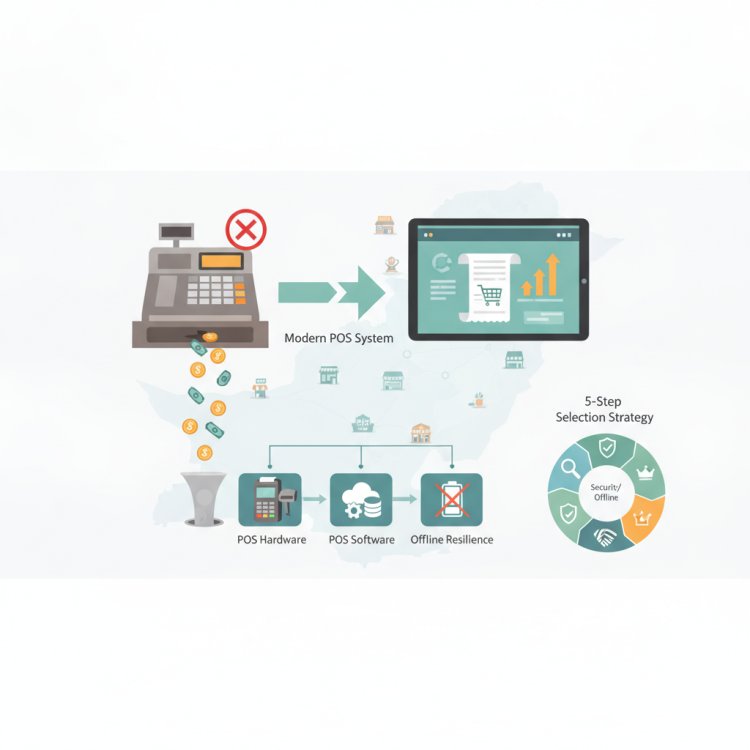
To evaluate POS systems intelligently, you must distinguish between the physical machinery at the counter and the software engine driving it behind the scenes.
1. POS Software (The Brain)
POS software handles the logic of your store. It processes product lookups, manages tax rules, updates warehouse levels, records payment methods (cash, card, mobile wallet), and compiles reports. Today's software generally falls into two camps:
- Legacy On-Premise Systems: Software installed on a local desktop hard drive. While it does not require an active internet connection to ring sales, your data remains trapped on that single computer. If the hard drive fails or the machine is damaged, your records vanish unless you maintained manual backups.
- Cloud-Based POS Systems: Systems hosted on secure remote servers that you can access from any internet-connected device—including laptops, tablets, and smartphones. Modern cloud systems combine central data visibility with local offline engines, ensuring that cash counters never stall when local broadband flickers.
2. POS Hardware (The Touchpoints)
Hardware refers to the physical devices your staff and customers interact with at checkout. A typical retail setup includes:
- Terminal Screen: A standard PC, laptop, or touchscreen tablet where the cashier selects products and closes tickets.
- Barcode Scanner: A handheld or presentation scanner used to read 1D or 2D barcodes, eliminating manual pricing errors.
- Receipt Printer: A high-speed thermal printer (typically 58mm or 80mm) that generates customer invoices without ink cartridges.
- Cash Drawer: A secure metallic drawer connected to the printer that automatically opens upon completing a cash sale.
- Payment Terminals: Bank card swipe/chip readers and merchant QR displays facilitating direct digital settlements.
- Specialized Peripherals: Digital weighing scales for grocery stores and bakeries, or mobile handheld devices for table-side restaurant ordering.
Why Manual Registers and Spreadsheets Fail Growing Businesses
Many independent retailers delay investing in a dedicated POS system because a basic calculator, an Excel sheet, or a paper bill pad seems "cheaper." In practice, running a store without a connected POS introduces invisible costs that eat into monthly margins:
If you only discover an inventory shortage during your quarterly physical count, your store has not experienced bad luck—it has suffered from a lack of operational visibility.
Without an automated POS system, shop owners routinely struggle with three recurring problems:
- Stock Blindness: Cashiers cannot tell you if an item is sitting in the back storeroom or another branch without walking away from the customer. Popular items sell out without triggering purchase orders, while dead stock sits unnoticed on shelves for months.
- Cash Counter Discrepancies: At the end of a 12-hour shift, cashiers count their drawers. When the cash in hand does not match total estimated sales, it is almost impossible to identify whether the shortfall came from mathematical errors, unauthorized discounts, or internal shrinkage.
- Inability to Delegate: Business owners find themselves chained to the shop counter because staff members lack restricted-access software. Without user roles that lock price overrides and refunds, leaving the counter feels like an unacceptable risk.
A Practical 5-Step POS Selection Strategy
Choosing the right POS platform can mean the difference between effortless business scaling and a painful technical headache. When reviewing options for your retail store, wholesale depot, or service outlet, follow this structured evaluation strategy:
Step 1: Map Your Industry-Specific Workflows
Every industry handles transactions differently. A grocery store needs rapid barcode scanning and scale integration; an apparel store requires size-and-color matrix tracking; a mobile shop requires dual-IMEI tracking per device; and a pharmacy demands batch numbering and expiry date tracking. Avoid generic platforms that force you to adapt your workflow to rigid, non-specialized templates.
Step 2: Insist on True Hybrid Offline Architecture
In Pakistan, internet outages and power load-shedding are operational realities, not edge cases. An online-only POS that displays a loading wheel the moment your fiber connection drops will paralyze your checkout line during peak rush hours. Look for software designed with an offline-first engine: billing continues locally without interruption, caching every transaction, and automatically syncing to the cloud as soon as the connection recovers.
Step 3: Evaluate Hardware Agility and Total Cost of Ownership
Beware of vendors who force you to purchase proprietary, overpriced hardware bundles that cannot be repurposed if you switch software. A modern POS should run flexibly on standard hardware you already own—standard Windows PCs, Android tablets, or smartphones—and connect with standard USB or Bluetooth thermal printers and scanners.
Step 4: Audit Multi-Store and Remote Monitoring Capabilities
If your plan is to grow from one outlet to three or four, your POS must support multi-branch management out of the box. You should be able to view consolidated sales, track inter-branch stock transfers, and monitor staff performance across all locations from a single dashboard on your phone, without having to physically visit each shop at closing time.
Step 5: Verify Local Regulatory and Tax Flexibility
Your POS platform must easily accommodate regional tax schedules, digital invoicing mandates, and fiscal integrations (such as FBR POS integration requirements) without demanding expensive custom code rewrites whenever national rules update.
Saveable Checklist: What to Look for in a POS System
- [ ] Offline Billing Support: Rings up sales smoothly even when the internet is completely disconnected.
- [ ] Real-Time Stock Alerts: Automatically notifies you before fast-moving items hit zero.
- [ ] Granular User Permissions: Prevents unauthorized staff discounts, bill deletions, or price changes.
- [ ] Customer Purchase Histories: Logs phone numbers and buying trends for targeted follow-ups.
- [ ] Multi-Device Flexibility: Operates reliably across desktop screens, tablets, and mobile devices.
- [ ] Integrated Shift Closing: Reconciles expected cash, digital payments, and physical drawer totals daily.
- [ ] Secure Cloud Backups: Protects operational data with encrypted off-site replication.
How CloudPOS Helps Pakistani Businesses Modernize
Designed specifically to meet the real-world operational challenges faced by Pakistani merchants, CloudPOS provides a full-featured, cloud-based POS and AI-powered ERP platform tailored for retailers, wholesalers, and service businesses.
Instead of wrestling with isolated cash registers or fragile local spreadsheets, CloudPOS equips you with an integrated business suite:
- Uninterrupted Offline Billing: Keep long checkout queues moving during connectivity drops. CloudPOS continues scanning barcodes, applying discounts, and printing receipts offline, automatically synchronizing data with the live server once your connection is restored.
- Unified Multi-Branch Control: Manage several store locations or warehouses from a single account. Monitor stock transfers, view consolidated branch profits, and adjust central prices across your network in seconds.
- Proactive Inventory Management: Prevent stockouts before they harm sales. Automated low-stock alerts notify your purchasing team when items reach their reorder threshold, while detailed batch and serial tracking safeguards specialized retailers such as mobile shops and pharmacies.
- Employee Accountability: Track individual staff sales, manage attendance, and set custom role permissions that protect profit margins from unauthorized register tampering.
- Enterprise-Grade Cloud Architecture: Built with live and replica servers, encrypted synchronization, and automatic off-site backups, ensuring your transaction history remains protected against local hardware failures.
- Compliance and Omnichannel Ready: CloudPOS natively supports digital invoicing, FBR fiscal integration, and eCommerce connections, allowing you to run counter sales and online orders through one synchronized catalog.
Moving from Manual Guesswork to Controlled Growth
A Point of Sale is no longer just the cash register at the front of your store. It is the command center that gives you total oversight of your inventory, staff productivity, customer relationships, and bottom-line profit. Continuing to rely on paper notebooks or disconnected hardware terminals leaves your business vulnerable to unrecorded losses and operational bottlenecks.
Take the time to assess your checkout workflow, understand the operational gaps currently costing you money, and select a system designed to scale alongside your ambitions.
Ready to see how modern, offline-resilient POS software can streamline your counters and protect your margins? Book a free CloudPOS demo today to experience the platform built for forward-thinking Pakistani businesses.